Accessing and Controlling an openUC2 / ImSwitch System (SDK)
1. Introduction
Every openUC2 microscope runs ImSwitch, a Python control server that exposes the complete instrument — stages, cameras, illumination, autofocus, acquisition workflows — over a self-documenting HTTP REST API plus a Socket.IO real-time channel.
There are four supported ways to work with the system, in increasing order of invasiveness:
| # | Approach | Use when |
|---|---|---|
| 1 | REST API (HTTP/JSON, OpenAPI 3 using swagger/fastapi) | Any language, any platform. The primary integration surface. |
| 2 | imswitchclient (Python SDK, ) | You work in Python / Jupyter and want typed convenience wrappers. Src: http://github.com/openUC2/imswitchclient |
| 3 | Socket.IO / streaming channels | You need live images, position updates, or state change notifications. |
| 4 | Plugin SDK / own controller | You want to add new functionality inside the server and have it appear automatically in the API and UI. (testing phase) |
Below that sits the firmware layer (UC2-ESP32 -> onlinelibrary.wiley.com/doi/full/10.1111/jmi.70147 over USB-serial or CAN ), which you normally should not address directly — ImSwitch owns the hardware connection.
Nothing needs to be recompiled or patched to control the microscope from outside. If you only want to drive the instrument, option 1 or 2 is the recommended path. If you want to extend it, option 4 is the recommended path — it survives ImSwitch updates, whereas forking the core does not (this is not yet mature enough to really recommend this path). In any case, you can also get in touch with us and we can try to help you out! :)
2. Architecture in one picture
  Your application  (Python / LabVIEW / C# / MATLAB / browser / …)
        │  HTTP+JSON (REST)          │  Socket.IO (events, frames)
        ▼                            ▼
  ┌────────────────────────────────────────────────────────────┐
  │  ImSwitch server  —  FastAPI + uvicorn, port 8001          │
  │                                                            │
  │   Controllers  (PositionerController, ExperimentController,│
  │                 LiveViewController, UC2ConfigController …) │
  │        every @APIExport method  →  one REST endpoint       │
  │                                                            │
  │   Managers  (detectors, positioners, lasers, LED matrix …) │
  └────────────────────────────────────────────────────────────┘
        │  UC2-REST (USB-serial / CAN-Open) │  vendor SDKs
        ▼                                   ▼
  UC2 ESP32 electronics                Cameras (Daheng, HIK,
  (motors, lasers, LEDs, focus)         Basler, picamera2, MMCore …)
The key design point: the REST API is generated, not hand-written. A controller method decorated with @APIExport is automatically published as an HTTP route and automatically appears in the OpenAPI schema. There is therefore no risk of the API and the implementation drifting apart, and adding a feature to the software adds it to the API for free.
3. Connecting
| Item | Default |
|---|---|
| Port | 8001 (--http-port) |
| Transport | http with a self-signed certificate; --no-ssl switches to HTTP. The official Docker image starts with SSL disabled. |
| API base path | /imswitch/api |
| OpenAPI schema | http://<host>:8001/imswitch/openapi.json |
| Interactive Swagger UI | http://<host>:8001/imswitch/api/docs |
| Web UI | http://<host>:8001/imswitch/ui/index.html |
| Socket.IO path | /imswitch/socket.io |
| CORS | open (*) — browser clients can call the API directly |
Start here: open the Swagger UI in a browser against a running microscope. It lists every endpoint available on that specific instrument, with parameters, types and a "Try it out" button. This is the authoritative, always-current API reference — more complete than any static document we could ship, because the endpoint set depends on which controllers the setup configuration activates.
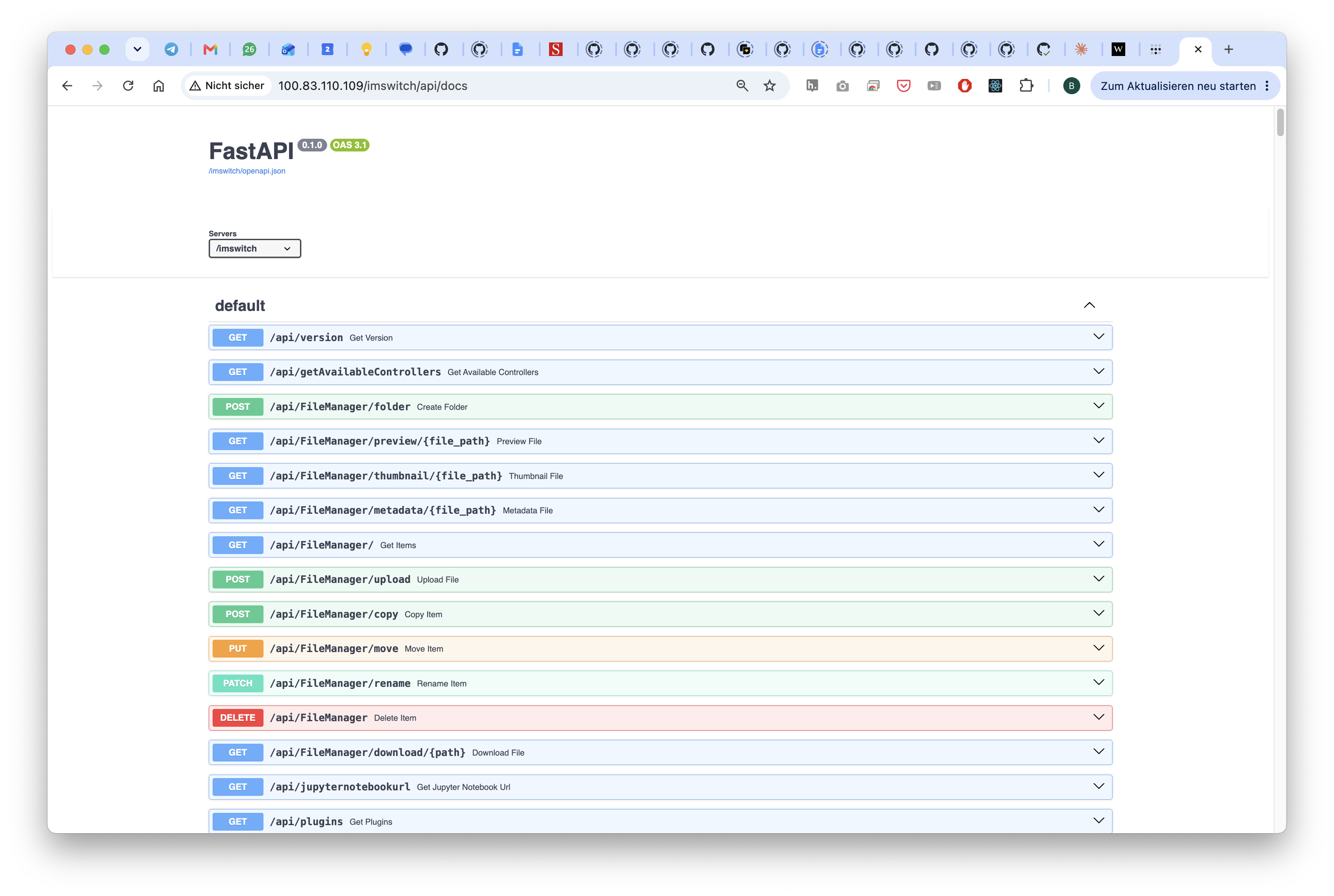
Two useful discovery endpoints:
GET /imswitch/api/version                 → {"version": "2.1.x"}
GET /imswitch/api/getAvailableControllers → {"availableControllers": [...]}
4. Option 1 — the REST API
4.1 URL convention
<scheme>://<host>:8001/imswitch/api/<ControllerName>/<methodName>
The controller name and the method name are exactly the Python class and method names.
4.2 Parameter conventions
- GET endpoints (the default) take parameters as query string arguments; Python argument names are used verbatim, and defaults are honoured.
- POST endpoints take a JSON body matching the declared Pydantic model.
- Return values are JSON-serialised Python return values.
4.3 Examples
(Assuming the microscope's IP is 192.168.1.50 - yours might be different and can be found e.g. by an IP scanner)
# List the configured stages
curl -k "http://192.168.1.50:8001/imswitch/api/PositionerController/getPositionerNames"

# Read all axis positions
curl -k "http://192.168.1.50:8001/imswitch/api/PositionerController/getPositionerPositions"

# Move X by 100 µm, relative, blocking
curl -k "http://192.168.1.50:8001/imswitch/api/PositionerController/movePositioner\
?positionerName=ESP32Stage&axis=X&dist=100&isAbsolute=false&isBlocking=true"

# Switch on an illumination source at a given power
curl -k "http://192.168.1.50:8001/imswitch/api/LaserController/setLaserActive?laserName=LED&active=true"
curl -k "http://192.168.1.50:8001/imswitch/api/LaserController/setLaserValue?laserName=LED&value=512"
4.4 Scope of the API
Roughly 700 endpoints across ~60 controllers are currently exported. The functional groups most integrators need:
| Controller | Purpose |
|---|---|
PositionerController | XYZ/A stage motion, homing, speed, limits, step size |
LaserController, LEDMatrixController | illumination on/off, intensity, patterns |
SettingsController, MMCoreController | camera exposure, gain, ROI, binning, pixel format |
RecordingController | snapshots (incl. snapNumpyToFastAPI for a direct image response), video/stack recording |
LiveViewController | live stream start/stop, protocol and compression selection |
ExperimentController | multi-dimensional acquisition: tiles, z-stacks, timelapse, channels |
WorkflowController | queued/scripted step sequences |
AutofocusController, FocusLockController | software autofocus and closed-loop focus hold |
HistoScanController, TilingController, StageMapController | large-area scanning and stitching |
UC2ConfigController | firmware/electronics configuration, setup file management, OTA update |
StorageController, FileManager routes | data browsing, download, disk usage |
4.5 Client generation for other languages
Because a valid OpenAPI 3 schema is served, you can generate a typed client for C#, Java, TypeScript, Rust, LabVIEW-friendly wrappers etc. directly (more information here https://openapi-generator.tech/):
openapi-generator-cli generate \
  -i http://<host>:8001/imswitch/openapi.json \
  -g csharp -o ./imswitch-csharp-client
This is the recommended route for non-Python environments — we do not maintain hand-written clients for other languages.
5. Option 2 — the Python SDK (imswitchclient)
A thin, dependency-light wrapper around the REST API, published on PyPI.
- Source: github.com/openUC2/imswitchclient
- Install:
pip install imswitchclient
import imswitchclient.ImSwitchClient as imc
import matplotlib.pyplot as plt

client = imc.ImSwitchClient(host="192.168.1.50", port=8001, ishttp=True)

stage = client.positionersManager.getAllDeviceNames()[0]
pos = client.positionersManager.getPositionerPositions()[stage]

client.lasersManager.setLaserActive("LED", True)
client.lasersManager.setLaserValue("LED", 512)

client.positionersManager.movePositioner(
    stage, "X", pos["X"] + 50, is_absolute=True, is_blocking=True
)

frame = client.recordingManager.snapNumpyToFastAPI()  # returns a NumPy array
plt.imshow(frame)
plt.show()
The client is organised into managers (positionersManager, lasersManager,
recordingManager, settingsManager, viewManager, experimentController,
mdaController, objectiveController, histoscanManager, communicationManager) plus a
socketClient for live events.
Two caveats worth stating:
- The SDK is a convenience layer, not a superset. It covers the common operations; it does not wrap all ~700 endpoints. Anything not wrapped is reachable with
client.get_json("/SomeController/someMethod", payload={...})orclient.post_json(...)using the same session and base URL. - Runnable examples, including Google Colab notebooks, live in the
examples/folder of that repository (autofocus, DPC, stitching, stage calibration, MDA).
6. Option 3 — real-time data and events
REST is request/response. For anything continuous, use the Socket.IO channel on the same port and host, path /imswitch/socket.io.
6.1 State and signal events
Internal signals are broadcast as MessagePack-encoded payloads on the event signal_msgpack, with the structure {"signal": "<SignalName>", "args": ...}. On connect, the server announces its capabilities on server_capabilities (messagepack, binary_streaming, protocol_version).
6.2 Image streaming
Live frames are delivered on a frame event with an explicit frame_ack back-pressure handshake — the server only sends the next frame once the client acknowledges the previous one, which prevents queue build-up on slow links.
Four stream protocols are selectable at runtime through LiveViewController:
| Protocol | Notes |
|---|---|
binary | raw pixels, LZ4 or Zstd lossless compression, optional subsampling — use this for quantitative work |
jpeg | lossy, low bandwidth |
mjpeg | browser-friendly |
webrtc | lowest latency for viewing |
Relevant endpoints: getStreamStatus, getCurrentStreamProtocol, and the setters for protocol, compression algorithm/level, subsampling factor and throttle interval.
For single quantitative images, prefer the REST snapshot endpoint over the live stream — it returns the full-bit-depth frame without stream-side subsampling.
7. Option 4 — extending the software
If your requirement is "we need a function that does not exist yet", do not fork the core. There are two supported extension mechanisms.
7.1 Add an endpoint to an existing/own controller (current stable branch)
Any method decorated with @APIExport in a controller becomes an HTTP endpoint at /imswitch/api/<ControllerName>/<methodName> on the next start. Nothing else is required — no route registration, no schema editing.
from imswitch.imcommon.model import APIExport


class MyController(ImConWidgetController):
    @APIExport()  # → GET
    def getSomething(self, name: str = "default") -> dict:
        return {"value": 42}

    @APIExport(requestType="POST")  # → POST, JSON body
    def doSomething(self, body: MyRequestModel): ...

    @APIExport(asyncExecution=True)  # for `async def` methods
    async def doSomethingSlow(self): ...
Decorator options: requestType ("GET"/"POST"), asyncExecution, runOnUIThread.
7.2 Plugin system v2 — the forward-looking path
⚠️ WARNING
The plugin system is still under development.
A plugin SDK is in development on the feature/pluginsystemV2 branch. It defines a stable public API surface so that third-party extensions no longer depend on ImSwitch internals:
from imswitch.plugin_sdk import PluginController, APIExport, Event


class MyPlugin(PluginController):
    sig_measurement = Event("measurement", schema={"value": "float"})

    @APIExport(method="POST", path="/measure")
    def measure(self):
        cam = self.ctx.hardware.detector("main")  # role-based, not device names
        stage = self.ctx.hardware.positioner("xy")
        ...
        self.sig_measurement.emit({"value": 42.0})
Properties of the plugin system:
imswitch.plugin_sdkis the only module a plugin is allowed to import; everything else (imcontrol,imcommon,MasterController) is host-private and may change.- The SDK is versioned independently of the host (
sdk_mininplugin.toml), with a backwards-compatibility guarantee inside a major version. - Hardware is requested by role (
detector:main,positioner:xy) declared inplugin.tomland resolved by the host against the active setup file — plugins never hard-code device names. - Routes mount under
/plugin/<name>/api/…, events under the Socket.IO namespace/plugin/<name>, and a React micro-frontend bundle under/plugin/<name>/ui/so a plugin can contribute its own UI panel. - Discovery is via the
imswitch.pluginsPython entry-point group (pip-installable), or by dropping a package into the directory given byIMSWITCH_PLUGIN_DIR(default/opt/imswitch/plugins, bind-mountable in Docker). - Declared permissions (
camera_read,camera_settings,file_write,network_egress) make a plugin's footprint explicit.
Recommendation: if you plan substantial new functionality, target the plugin SDK and tell us early — the interface is not yet frozen and we would rather accommodate a concrete integration requirement than break one.
8. Other available interfaces
| Interface | Status | Notes |
|---|---|---|
| Jupyter kernel | available | ImSwitch can start with an embedded kernel (--with-kernel, default port 8888) giving direct in-process scripting against the live instrument. |
| SiLA 2 | experimental | SiLa2Controller, based on unitelabs-cdk, for lab-automation environments that standardise on SiLA. |
| Micro-Manager / MMCore | available | Cameras and devices can be driven through MMCore; MMCoreController exposes their properties over REST. Useful if your stack is already Micro-Manager-based. |
| Arkitekt / Hypha | experimental | Controllers exist for integration into these distributed bio-imaging frameworks. |
| OME-Zarr / OME-TIFF output | available | Acquisitions are written in standard formats; downstream analysis needs no ImSwitch dependency. |
| UC2-REST (firmware) | available, not recommended for integrators | Direct USB-serial or CAN-Open access to the ESP32 electronics via the uc2-rest / uc2canopen Python packages. Only relevant if you build your own control software instead of using ImSwitch; the port is exclusively held by ImSwitch while it runs. |
9. Deployment notes
- ImSwitch normally runs in Docker on the microscope's embedded computer (Raspberry Pi 5 or comparable) and starts automatically. Your software can be on any machine on the network. => checkout https://github.com/openUC2/os-rpi/ for more information
- Relevant ports:
8001(API + Socket.IO),8888(Jupyter),3232/3333(ESP32 OTA). - The default TLS certificate is self-signed — HTTP clients need certificate verification disabled, or run with
--no-sslon a trusted network. - There is currently no authentication layer. Treat the API as trusted-network-only, or place it behind a reverse proxy that terminates TLS and handles auth. This is a known gap and is on the roadmap; tell us if you have a specific requirement.
- Hardware configuration (which camera, stage, illumination, calibration) lives in a JSON setup file that can be read and written through
UC2ConfigController— so provisioning can be automated too.
10. Stability and versioning
Honest assessment of what you can build on:
| Layer | Stability |
|---|---|
REST URL scheme (/imswitch/api/<Controller>/<method>) | stable |
| Existing endpoint names and signatures | stable in practice; individual endpoints may gain optional parameters. Breaking renames are rare and go through release notes. |
| OpenAPI schema | authoritative — always generate against the instrument you target |
| Socket.IO event names and payload shapes | mostly stable; the frame/streaming protocol is still evolving |
imswitchclient API | stable for the wrapped subset |
imswitch.plugin_sdk | not yet frozen (SDK 1.0.0 on a feature branch) |
Internal modules (imcontrol, imcommon) | no compatibility guarantee — do not import from a plugin |
We pin ImSwitch versions in the Docker image, so a deployed instrument does not changeunder you. Please tell us which version you validate against.
11. Links
| Resource | URL |
|---|---|
| ImSwitch (openUC2 fork), main branch | github.com/openUC2/ImSwitch/tree/master/imswitch |
| Plugin system v2 branch | github.com/openUC2/ImSwitch/tree/feature/pluginsystemV2 |
| Python client SDK | github.com/openUC2/imswitchclient |
| Client on PyPI | pypi.org/project/imswitchclient |
| Additional developer docs | docs/ folder in the ImSwitch repository |
| Live API reference | http://<your-microscope>:8001/imswitch/api/docs |
| openUC2 project | openuc2.com |